
PDFVertex vs Smallpdf
Smallpdf is a polished online PDF suite with a free tier and paid plans. PDFVertex is a free set of tools that work in your browser. This page covers what actually differs.
Short answer
Choose PDFVertex for quick jobs on private files without a task counter. Choose Smallpdf when you want its editor, e-signature features, Office conversion or apps and are fine with a subscription.
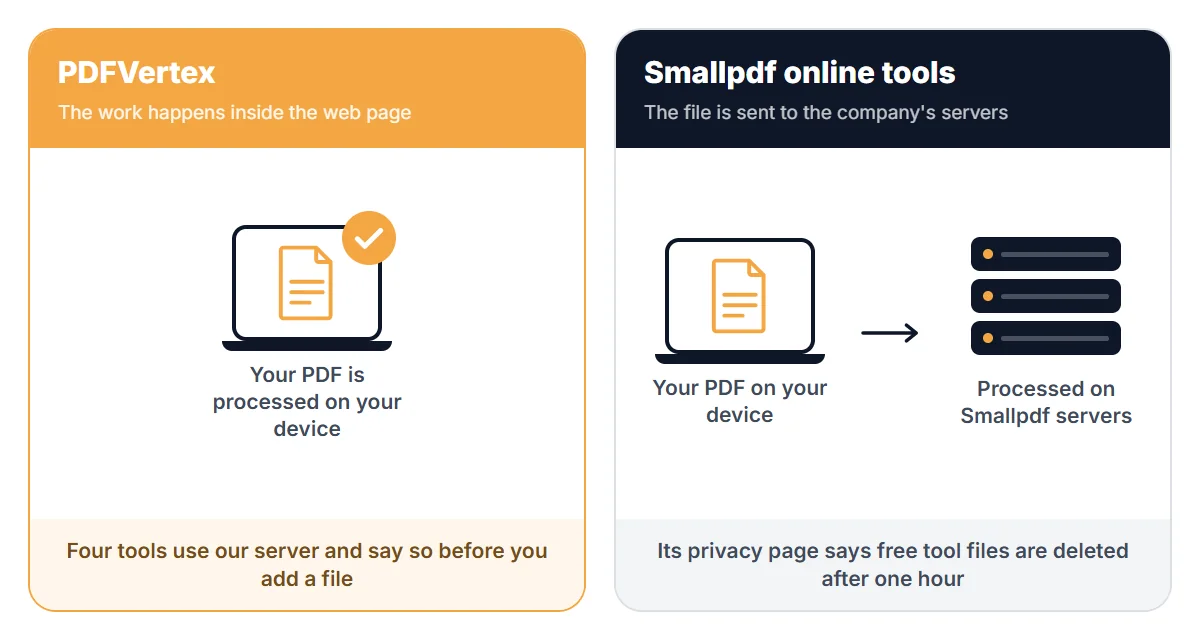
Where your file goes
Side by side
| PDFVertex | Smallpdf | |
|---|---|---|
| Where files are processed | In your browser, for every tool. Your file is not uploaded. | On Smallpdf servers. Its privacy page says files from free tool use are deleted after one hour. |
| Free usage | Free to use. Each tool page shows its own file size limit before you add a file. | The free plan has a daily limit on tasks. Check its pricing page for the current number. |
| Word, Excel, PowerPoint to PDF | Not available. | Available. |
| E-signatures | Sign PDF places your signature on a page. It does not send documents to other people to sign. | Offers e-signature features. |
| Security certification | Not applicable for browser-side tools, since files are not sent to us. | Says it is ISO/IEC 27001 certified. |
| Compress to a set size | Pages for 50 KB, 100 KB, 200 KB, 300 KB, 500 KB, 1 MB and 2 MB. | Compression levels to choose from. |
Last checked November 2026. Limits, prices and policies change, so confirm the details that matter to you on the official pages listed at the end.
Where Smallpdf is stronger
- Broader suite with Office conversion, editing and e-signature features.
- Desktop and mobile apps.
- A stated security certification, which some companies require.
Where PDFVertex is stronger
- No upload for nearly every tool, so nothing is stored anywhere but your device.
- No daily task counter.
- Single-purpose pages for size targets, page numbers, headers, flattening and metadata.
Which one should you pick?
Pick PDFVertex if
You need a few quick jobs, do not want a subscription and would rather not upload the file.
Pick Smallpdf if
Your team needs a full document suite, e-signature workflows or a vendor with a security certification.
Questions
Is PDFVertex really free?
Yes. Every tool is free to use, with no plan, account or subscription. Each tool page shows its file size limit.
How long does Smallpdf keep files?
Its privacy page says files from free tool use are deleted after one hour, and files kept in an account are kept until you delete them. Read its current terms for exceptions.
Can PDFVertex replace Smallpdf?
For merging, splitting, compressing, converting images and securing files, yes. For Office conversion, document editing and e-signature workflows, no.