
How to Add a Header and Footer to a PDF
Put a title, date, confidential label or page count in the top or bottom margin of every page of a PDF. Six positions, no upload.
Headers and footers carry what every page needs: the document title, a "Confidential" label, the date, the page count. Adding them after the PDF is made is simple.
Steps
- Open Add Header and Footer.
- Add your PDF.
- Type text into any of six boxes: header left, center or right, and footer left, center or right. Leave a box empty to skip it.
- Choose font, color, size and distance from the edge.
- Select "Add to PDF" and download the file.
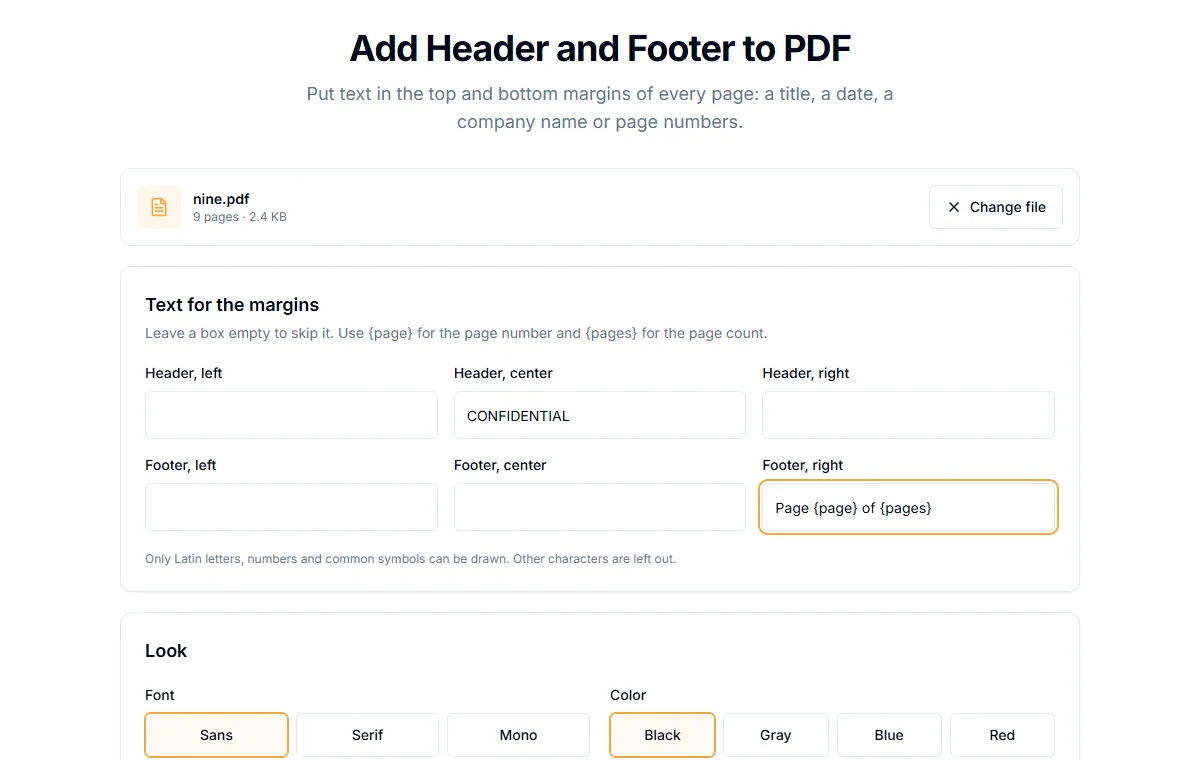
Page numbers inside the text
Two placeholders are replaced on every page:
{page}becomes the page number.{pages}becomes the total number of pages.
So Page {page} of {pages} in the footer right box becomes "Page 3 of 9" on page 3. If you only need numbers, Add Page Numbers has ready formats.
Ideas that work well
| Where | Text |
|---|---|
| Header center | CONFIDENTIAL |
| Header left | The document title |
| Footer left | Draft v2, 4 November 2026 |
| Footer right | {page} / {pages} |
Limits to know
- Latin characters only. The built-in fonts can draw English and other Latin-script text, numbers and common symbols. Characters outside that set, such as Chinese or Arabic, are left out. In our test,
中was dropped and the rest of the text was kept. - Same text on every page. Other than the placeholders, each box shows the same text everywhere.
- Long text. Keep headers short. A long line can run into the other boxes.
Header versus watermark
A header sits in the margin. A watermark sits behind or across the page content. For a large "DRAFT" across the page, use Add Watermark instead.
Is it private?
The text is added in your browser. The file is not uploaded.
Related guides
Try Our Free PDF Tools
Put what you learned into practice with our free online PDF tools.
Explore ToolsRelated Articles
How to Add Page Numbers to a PDF
Add page numbers to a PDF online: pick a format and position, start from any number and skip the cover page. No upload needed.
How to Edit PDF Metadata: Title, Author and Keywords
Change or remove the title, author, subject and keywords stored inside a PDF. Why it matters for privacy and for how your file looks in search and tabs.
How to Flatten a PDF and Lock Form Fields
Flattening turns fillable form fields into plain page content so nobody can change them. How to do it, and when it is the right step.