
How to Edit PDF Metadata: Title, Author and Keywords
Change or remove the title, author, subject and keywords stored inside a PDF. Why it matters for privacy and for how your file looks in search and tabs.
Every PDF carries hidden details: a title, an author, keywords and the software that made it. You rarely see them, but other people can. Editing them takes a minute.
Why bother
- Privacy. The author field often holds your full name or your company. The "created with" field can show internal software names. If you send a file to someone outside, you may not want that.
- Browser tab and reader title. Many readers show the Title field instead of the file name. A title like "Microsoft Word - Document1" looks careless.
- Search. Keywords and subject help document systems and some search tools find the file.
Steps
- Open Edit PDF Metadata.
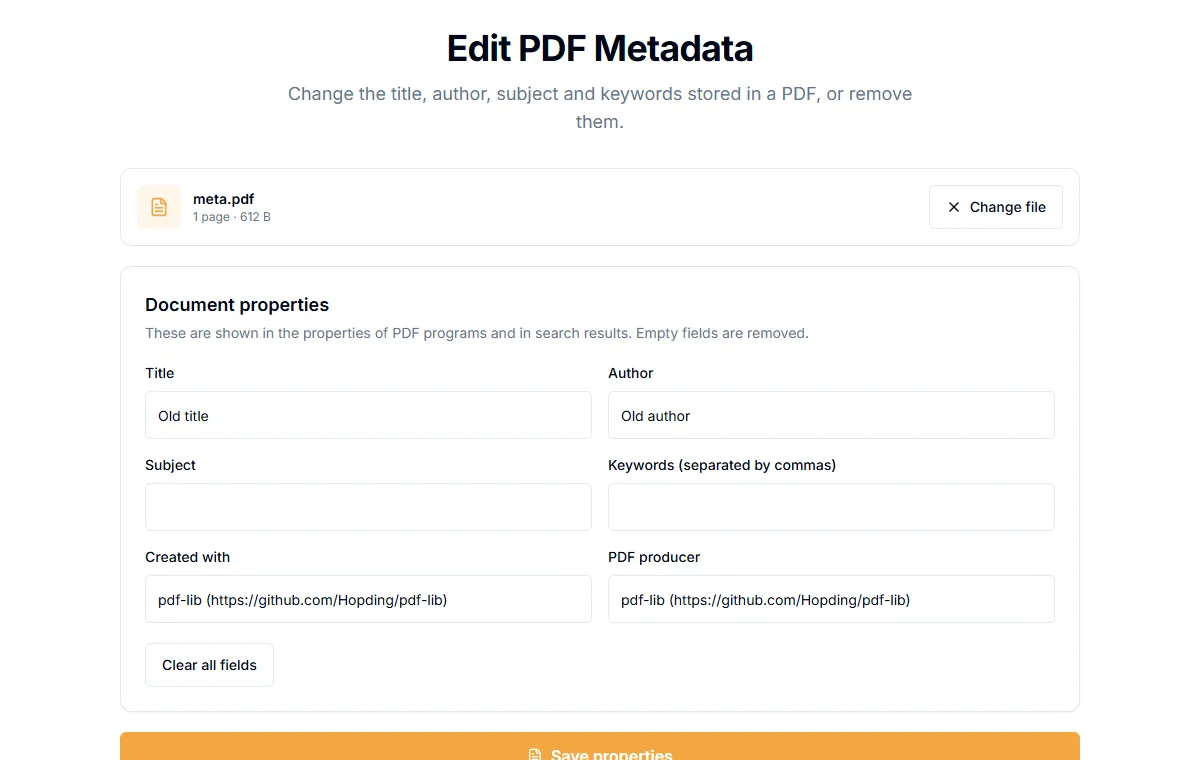
- Add your PDF. The current values load into the form.
- Edit the fields: "Title", "Author", "Subject", "Keywords (separated by commas)", "Created with" and "PDF producer".
- To remove a value, clear the field.
- Select "Save properties" and download the file.
Empty fields are removed from the file, not stored as blanks.
Examples
| Goal | What to do |
|---|---|
| Hide who made the file | Clear "Author", "Created with" and "PDF producer" |
| Proper tab title | Set "Title" to the real document title |
| Better search | Add keywords such as invoice, 2026, acme |
What metadata is not
Metadata is the information stored about the document. It is not the content. Names written on the pages stay on the pages. Comments, hidden layers and attachments can also hold information. If you need to remove content, use Redact PDF.
Is it private?
The edits are made in your browser. The file is not uploaded.
Related guides
Try Our Free PDF Tools
Put what you learned into practice with our free online PDF tools.
Explore ToolsRelated Articles
How to Add a Header and Footer to a PDF
Put a title, date, confidential label or page count in the top or bottom margin of every page of a PDF. Six positions, no upload.
How to Add Page Numbers to a PDF
Add page numbers to a PDF online: pick a format and position, start from any number and skip the cover page. No upload needed.
How to Flatten a PDF and Lock Form Fields
Flattening turns fillable form fields into plain page content so nobody can change them. How to do it, and when it is the right step.