
How to Add Page Numbers to a PDF
Add page numbers to a PDF online: pick a format and position, start from any number and skip the cover page. No upload needed.
A long PDF without page numbers is hard to discuss. "See page 12" only works if page 12 says 12. Here is how to add numbers in a minute.
Steps
- Open Add Page Numbers.
- Add your PDF.
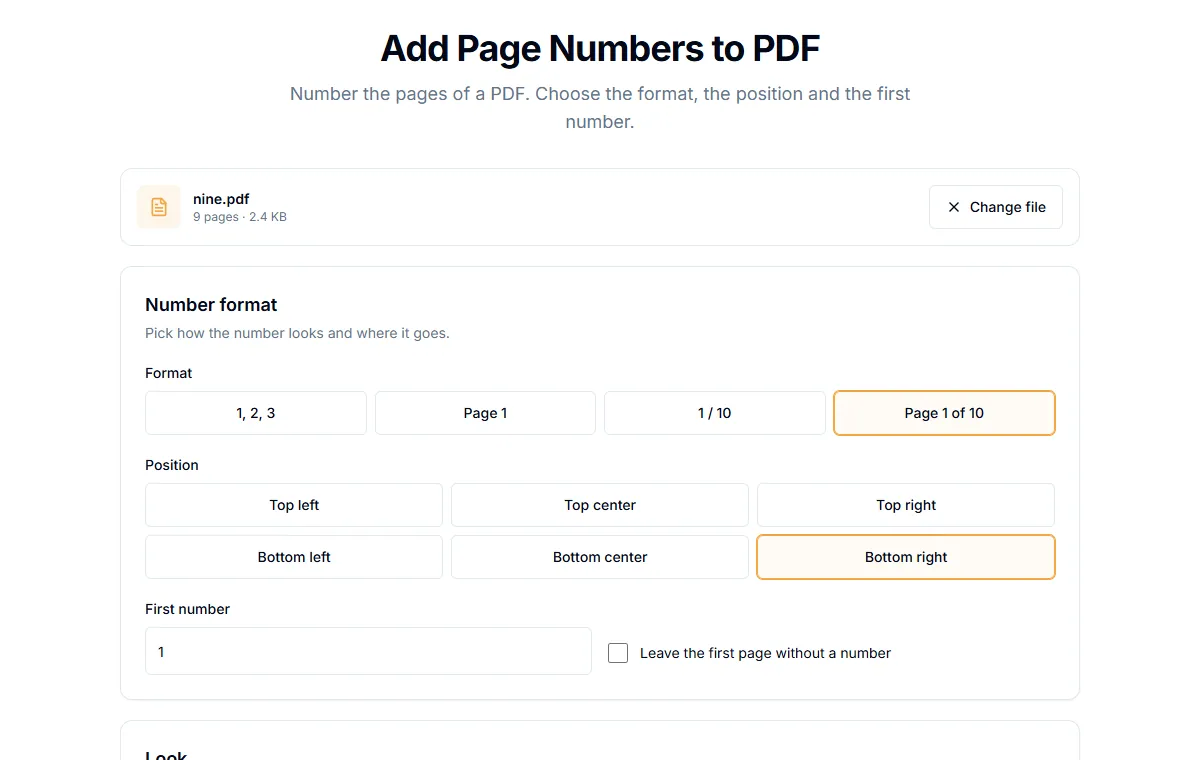
- Under "Number format", choose how it looks:
1, 2, 3,Page 1,1 / 10orPage 1 of 10. - Under "Position", pick one of six places: top or bottom, left, center or right.
- Set "First number" if you do not want to start at 1.
- Select "Add page numbers" and download the file.
Start at a different number
If your PDF is chapter 3 of a larger document, set "First number" to the page where it begins. The numbers continue from there.
Leave the cover page without a number
Tick "Leave the first page without a number". The cover stays clean. The second page shows the number you set as "First number", so with the default of 1 the second page is numbered 1.
Make them look right
Under "Look" you can change:
- Font: sans, serif or mono.
- Color: black, gray, blue or red.
- Text size: in points. 10 to 12 suits most documents.
- Distance from the edge: raise it if a printer might cut off the number.
Pages of different sizes
The number is placed relative to each page, so mixed sizes and rotated pages still get the number in the right corner.
Common questions
Can I put the number inside a header or footer text? Yes. Use Add Header and Footer and type {page} or {pages} in any box. See how to add a header and footer to a PDF.
Does it change my text? No. The number is drawn on top of the page. The original content is not touched.
Is my file uploaded? No, it is processed in your browser.
What about other alphabets? The built-in fonts draw Latin letters, numbers and common symbols. Numbers are always fine.
Related guides
Try Our Free PDF Tools
Put what you learned into practice with our free online PDF tools.
Explore ToolsRelated Articles
How to Add a Header and Footer to a PDF
Put a title, date, confidential label or page count in the top or bottom margin of every page of a PDF. Six positions, no upload.
How to Edit PDF Metadata: Title, Author and Keywords
Change or remove the title, author, subject and keywords stored inside a PDF. Why it matters for privacy and for how your file looks in search and tabs.
How to Flatten a PDF and Lock Form Fields
Flattening turns fillable form fields into plain page content so nobody can change them. How to do it, and when it is the right step.