
Are Online PDF Tools Safe? What Happens to Your Files
How online PDF tools handle your documents, the difference between upload-based and browser-based tools, and how to check before you trust one.
You drop a contract, a payslip or a passport scan into a free website. Where does it go? The answer depends on how the tool is built, and it is rarely shown on the page.
Two ways a PDF tool can work
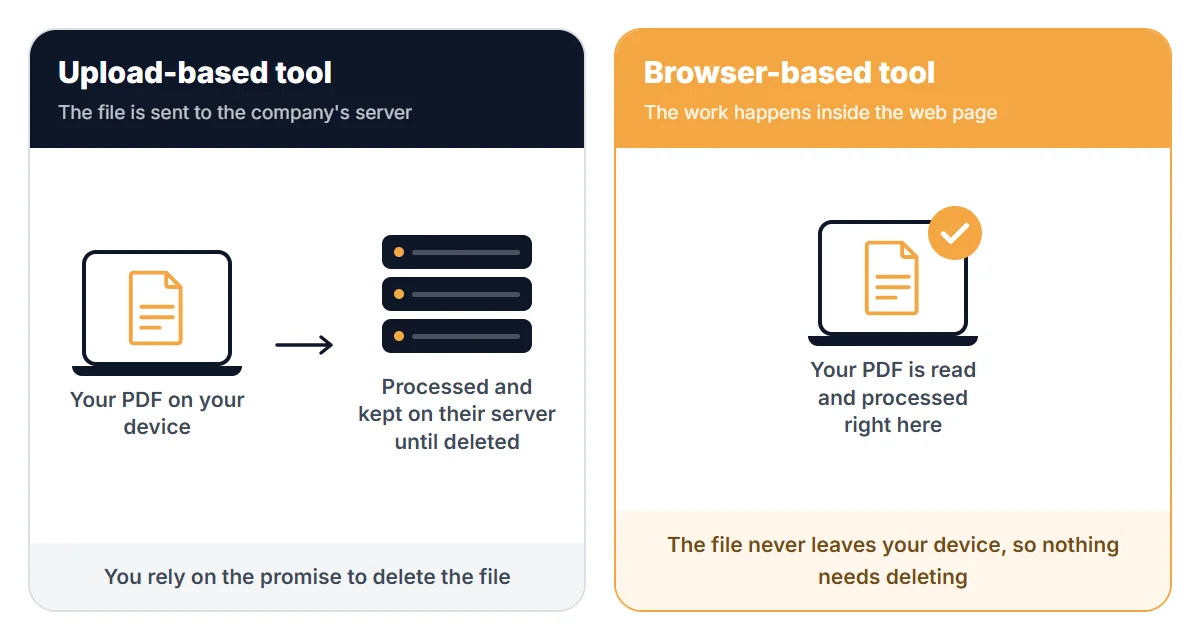
Upload-based. The tool sends your file to its servers, processes it there and sends the result back. Most big online PDF sites work this way. Their own pages usually say files are deleted after a set time. For example, iLovePDF says files are deleted within two hours, and Smallpdf says one hour for free tool use. These are their statements. You are trusting them to keep the promise.
Browser-based. The tool runs on your device, inside the web page. The file is read from your disk by the page and never sent out. Nothing needs to be deleted because nothing was stored.
Why it matters
- A file on someone else's server can be affected by a breach, a mistake or a legal request.
- Short retention times reduce risk but do not remove it. Backups and logs are not always covered by the headline number.
- Documents with names, addresses, account numbers, IDs or health information deserve the lower-risk option.
What PDFVertex does
Most PDFVertex tools run in your browser: merge, split, compress, rotate, sign, redact, protect, page numbers, images to PDF and more. The file does not leave your device.
Every PDFVertex tool runs in your browser, including OCR, PDF to Word, PDF to HTML and EPUB to PDF. Nothing is uploaded, so there is nothing to delete later.
How to check any tool yourself
- Open your browser's developer tools (press F12) and go to the Network tab.
- Use the tool with a harmless test file.
- Look for a large upload request. If a request to a server carries your file, it is an upload tool. If you see no large upload, the work is local.
You can also disconnect from the internet after the page loads. A browser-based tool still works. An upload tool fails.
A short checklist
- Does the page say where the file is processed?
- Is there a stated deletion time, and a way to delete early?
- Does the privacy policy match the page?
- Are you asked to sign in for a one-off job? A tool that needs no account holds less about you.
- Is the connection secure (https)?
Extra steps for sensitive files
- Remove information you do not need to share with Redact PDF, as explained in how to redact a PDF permanently.
- Protect the file with a password. See how to password protect a PDF.
- Clear author names and software details with Edit PDF Metadata.
Comparing services
We compare PDFVertex with other tools, including where each one processes files, on the comparison pages.
Related guides
Try Our Free PDF Tools
Put what you learned into practice with our free online PDF tools.
Explore ToolsRelated Articles
How to Password Protect a PDF
Add a password to a PDF with AES-256 encryption. Choose whether people can print, copy or edit it. The file never leaves your device.
How to Redact a PDF So the Text Is Really Gone
Black boxes drawn over text can be removed. Learn how to redact a PDF properly so names, numbers and addresses cannot be copied out.
How to Remove a Password from a PDF You Own
Take the password off a PDF when you know it, so it opens without prompts. What this can and cannot do, and what to try if you forgot the password.