
How to Password Protect a PDF
Add a password to a PDF with AES-256 encryption. Choose whether people can print, copy or edit it. The file never leaves your device.
A password makes a PDF unreadable to anyone who does not have it. Use it for contracts, payslips, ID scans and anything else you send over email.
Steps
- Open Encrypt PDF. It is the same tool as Protect PDF.
- Add your PDF.
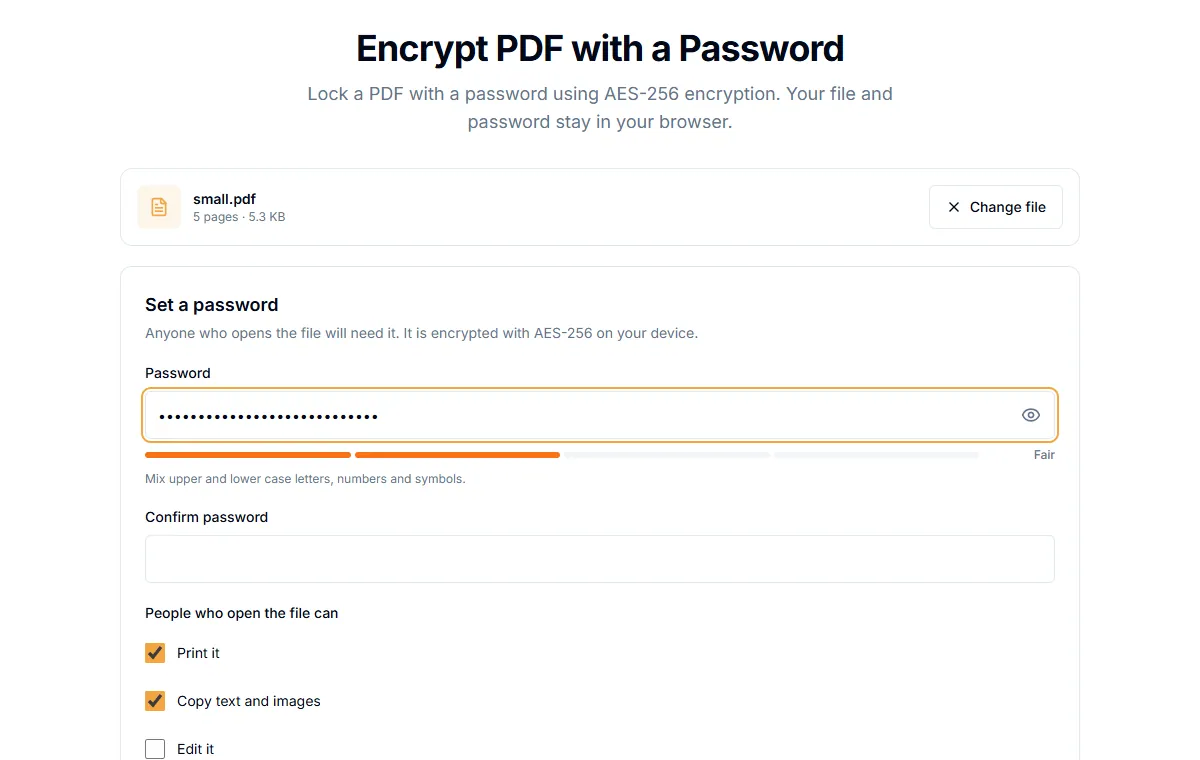
- Under "Set a password", type a password in "Password" and again in "Confirm password".
- Choose what people can do once they open the file: "Print it", "Copy text and images", "Edit it".
- Select "Protect PDF" and download the protected file.
The file is encrypted with AES-256. Everything happens in your browser, so neither the file nor the password is sent to a server.
Pick a good password
- Use at least 12 characters, ideally a phrase of several words.
- Do not reuse a password from an account.
- Send the password by a different channel than the file. Text it, or tell the person.
What the permission boxes do
| Box | If unticked |
|---|---|
| Print it | Readers that follow the rules will not print |
| Copy text and images | Copying out of the file is blocked |
| Edit it | Editing and form changes are blocked (this is off by default) |
These permissions are respected by Adobe Acrobat and most readers, but some software ignores them. The password to open the file is the strong protection. The permission boxes are a polite request, not a lock.
You cannot recover a lost password
If you lose the password, the file cannot be opened. Keep the password in a password manager. Keep an unprotected copy somewhere safe too, if the content matters.
Protecting a file does not hide its name
The file name and size are visible to anyone who has the file. Do not put secrets in the file name.
Remove the password later
If you want to take the password off a file you own, see how to remove a password from a PDF.
Related guides
Try Our Free PDF Tools
Put what you learned into practice with our free online PDF tools.
Explore ToolsRelated Articles
Are Online PDF Tools Safe? What Happens to Your Files
How online PDF tools handle your documents, the difference between upload-based and browser-based tools, and how to check before you trust one.
How to Redact a PDF So the Text Is Really Gone
Black boxes drawn over text can be removed. Learn how to redact a PDF properly so names, numbers and addresses cannot be copied out.
How to Remove a Password from a PDF You Own
Take the password off a PDF when you know it, so it opens without prompts. What this can and cannot do, and what to try if you forgot the password.