
How to Print Multiple PDF Pages on One Sheet
Put 2, 4, 6 or 9 PDF pages on each sheet to save paper. Choose A4 or US Letter and get a new PDF ready to print.
Printing a long slide deck or handout one page per sheet wastes paper. Putting several pages on each sheet is the fix. Many printer dialogs have this option, but they differ, and you cannot share the result. Making the sheets in a PDF gives you a file that prints the same everywhere.
Steps
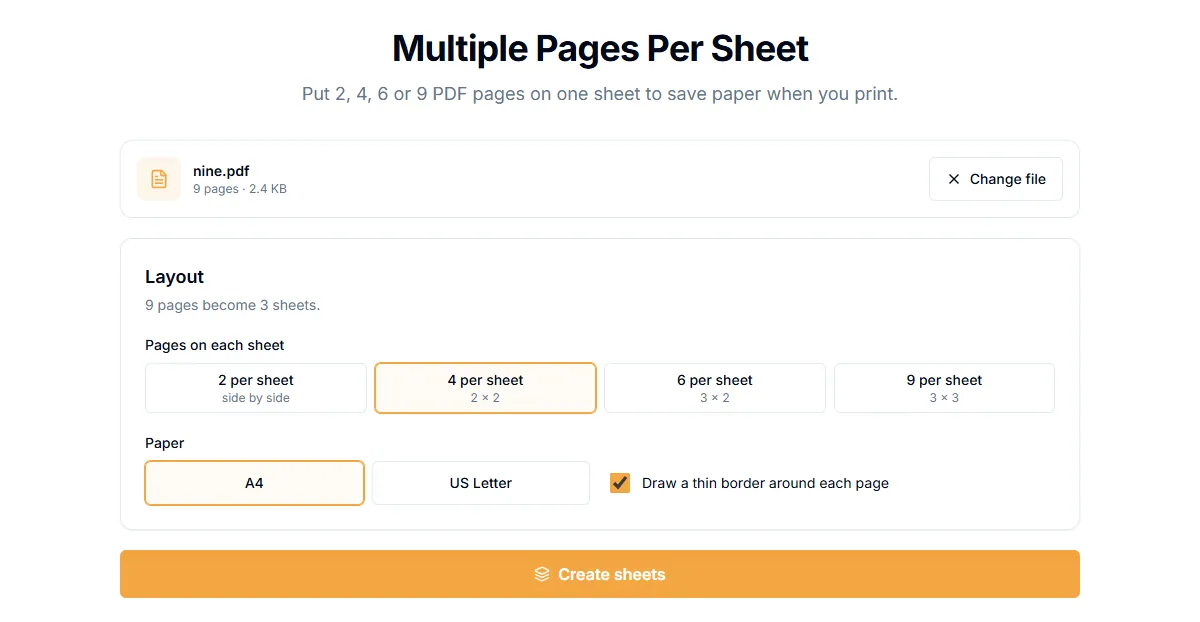
- Open Multiple Pages per Sheet.
- Add your PDF.
- Under "Pages on each sheet", pick "2 per sheet", "4 per sheet", "6 per sheet" or "9 per sheet".
- Under "Paper", choose "A4" or "US Letter".
- Select "Create sheets" and download the new PDF.
A 9-page file with "4 per sheet" becomes 3 sheets. The result page tells you how many sheets were created.
Which layout to choose
| Layout | Good for |
|---|---|
| 2 per sheet | Documents with text you need to read comfortably |
| 4 per sheet | Slides and handouts. The usual choice |
| 6 per sheet | Quick reference sheets and long decks |
| 9 per sheet | Thumbnails and proofing. Text becomes very small |
Tips
- Keep readable text. At 6 or 9 per sheet, small print can be unreadable. Print one test sheet first.
- Landscape slides. Slides are wider than tall. They usually fit well at 2 or 4 per sheet.
- Two sided. Print the new file double sided if your printer supports it, to halve the paper again.
- Different page sizes. Each page is scaled to fit its cell, so mixed sizes still work.
Reading order
Pages fill each sheet left to right, then top to bottom. For booklets, where sheets are folded, you need a booklet layout, which is a different task.
Is it private?
The sheets are created in your browser. Your file is not uploaded.
Related guides
Try Our Free PDF Tools
Put what you learned into practice with our free online PDF tools.
Explore ToolsRelated Articles
How to Add a Header and Footer to a PDF
Put a title, date, confidential label or page count in the top or bottom margin of every page of a PDF. Six positions, no upload.
How to Add Page Numbers to a PDF
Add page numbers to a PDF online: pick a format and position, start from any number and skip the cover page. No upload needed.
How to Edit PDF Metadata: Title, Author and Keywords
Change or remove the title, author, subject and keywords stored inside a PDF. Why it matters for privacy and for how your file looks in search and tabs.